
Choose the Sign-In Details You Originally Used
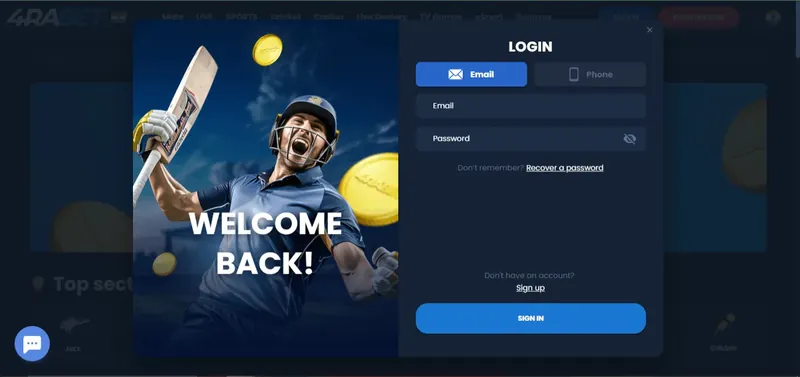
The published form has separate options for a phone number and for email or account ID. Select the one that matches your details. A correct password can still fail if you put a number in the email field. The name shown on your profile may also differ from the account ID requested.
| Way to Sign In | Details to Verify | Typical Error |
|---|---|---|
| Email address used at registration | Entering an address the account has never used | |
| Account ID | Identifier the operator has on file | Entering the name displayed on your profile |
| Phone | Registered number and its dialling code | Adding the country code twice |
| Autofill | The saved record for this account and site | Submitting a previous password from autofill |
Being able to sign in from India does not show whether you may pay in or play for money. Read the guide to Indian rules whether or not you can open the page.
Resetting a Password Safely
Begin on the verified account screen. Before requesting a reset, check its destination. A masked number or address can reveal the wrong account. The reset message should follow your own request. Be wary of an unexpected prompt from someone claiming to be support.
- On the verified sign-in screen, select account recovery.
- Enter the number, address or identifier already linked to your profile.
- Check where the recovery message went and what action it describes.
- Set a different password that meets the requirements shown.
- Go back to the verified login page and test the new credentials.
Keep OTPs, reset links and recovery codes to yourself. Sharing them with staff, friends or a coupon channel could give someone control of your account. If a person has gained access to the email linked to the account, secure that inbox while recovering your sign-in.
Use the Error Message to Pick the Next Step
Retries alone do not tell you if the password, connection or account is at fault. Save the exact message. Invalid credentials and a locked account are separate issues. A site that will not open may reflect a network or legal restriction instead of a login error.
| What You See | First Thing to Verify | What to Do |
|---|---|---|
| Password rejected | Keyboard settings and stored password | Reset it with the official recovery option |
| Reset message missing | The target address or number and junk mail | Ask for help on a verified channel |
| Locked account | Exact error text and case ID | Continue with the operator’s account review |
| Webpage will not open | Connection and any notice shown | Respect limits on access by location |
| Balance you do not recognise | Which account and balance you selected | Check the transaction record before acting |
When a One-Time Code Has Not Reached You
Check the destination and whether the device receives ordinary messages. A replaced SIM, mail filter or mistyped address can stop delivery. If you requested multiple codes, follow instructions on expiry and resending. Guessing or sending rapid requests can make diagnosis harder.
Keep recovery on a phone you control. A public SMS inbox or borrowed number can expose the code and separate the account from its owner. If you no longer control the registered number, ask the operator to check ownership instead of signing up again.
A payment OTP and one for restoring an account can look alike. Read which action the message authorises. You should never have to send a banking PIN in a support conversation to resolve a login problem.
Securing the Account Once You Are Back In
Look through recent activity and the available payment history. Check whether contacts have changed or unfamiliar transactions or profile edits have appeared. If you can manage sessions, sign out of ones you do not recognise. A password reset might leave an old session running, so check the controls.
Use a unique password and additional authentication for the linked email. If you lost a phone, also use the device provider’s security settings. Even after recovering the account, it can be exposed if someone else still has the phone or inbox used for recovery.
If you have questions about money already in the account, keep the transaction references and consult the guide to withdrawals. Do not send money to someone who claims a fee will restore access.
What to Tell the Support Team
Through secure support, send the account ID, exact error, time and whether you used a browser or the app. Hide passwords, codes and unrelated payment details from screenshots. Keep identity documents out of public comments.
Tell support if you recently reset the password, changed your email or number or changed devices. This helps more than repeatedly saying you cannot get in. Ask for a case reference so follow-up messages can be linked to the original report.
See the guide to using 4rabet on mobile for device-specific problems. The guide to opening an account describes how accurate registration data helps with recovery. Neither requires an unverified mirror address or false identity.
Signing In on Android in India
The app and browser use the same sign-in details. In the Android form, choose phone, account ID or email according to how you originally registered. If +91 appears separately, check whether the field takes the national number alone. Entering the prefix twice can produce a format error.
When you reset a password, change the autofill entry on all devices you use. If Android fills an older password, pick the correct entry instead of resubmitting it. An open browser session does not confirm the password the app is sending.
If the app alone will not sign in, note its release, Android version and exact error. Check the guide to common Android app problems. If you see a restriction on both app and browser, follow the account review. Signing in from India does not show that real-money play is permitted or that your payment method is available.
Questions About Sign-In and Recovery
Does the sign-in form accept a mobile number?
The published form offers a phone option. Use your registered number and check where to enter the country code.
How can I recover the account without my original number?
Contact verified support to prove ownership. Avoid public SMS inboxes and do not use someone else’s identity.
Can a sign-in problem tell me what happened to my funds?
An error in accessing the account does not show what is in it. Follow the recovery process, then check your payment history.
Is a mirror an appropriate response to a restricted login page?
A legal or location restriction should be respected. Do not try to bypass it using another domain or method.